
Download Xftp – File Transfer, SFTP, FTP, Secure, Windows, Utility, Tool, Productivity
Overview
Xftp is a dedicated file transfer utility designed for users who require secure, efficient, and reliable methods to move files across networked systems. Built specifically for the Windows platform, it serves as a powerful tool for professionals managing remote servers, developers, IT administrators, and anyone who frequently transfers sensitive data. The app’s core purpose lies in simplifying file transfer workflows while maintaining high security standards through support for SFTP and FTP protocols. This makes it particularly valuable in environments where data integrity and confidentiality are critical.
Target users include system administrators, web developers, and technical teams who need to manage files on remote servers without relying on command-line tools. Xftp’s ability to handle multiple transfer sessions simultaneously enhances productivity, especially in complex work environments. Real-world use cases include deploying website updates, backing up server data, and synchronizing project files across development and production environments. By offering a graphical interface for traditionally command-line operations, Xftp lowers the barrier to entry for users unfamiliar with terminal-based tools.
Developed by VanDyke Software, a company known for its secure networking tools, Xftp benefits from a strong reputation in the enterprise and technical communities. The application’s focus on security, usability, and performance aligns with modern digital workflows. Although the developer did not provide additional technical details about underlying architecture or integration capabilities, the app’s consistent release cycle and dedicated support suggest a mature product. In the broader productivity tool ecosystem, Xftp fills a vital niche by combining the power of secure protocols with a user-friendly interface, making it a go-to solution for secure file management on Windows systems.
Key Features & Functionality
- Secure File Transfer via SFTP and FTP: Xftp ensures data protection during transmission by leveraging industry-standard SFTP and FTP protocols. This is essential for users handling confidential documents, source code, or business-critical files. The encryption provided by SFTP prevents unauthorized access, even on untrusted networks.
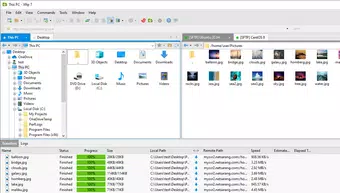
- Intuitive Tabbed Interface: The app features a clean, tab-based layout that allows users to manage multiple file transfer sessions within a single window. This design enhances workflow efficiency, especially when working with several servers or remote directories simultaneously.
- Drag & Drop File Transfer: Users can transfer files by simply dragging them between local and remote directories. This eliminates the need for complex command sequences and reduces the risk of human error during file operations.
- Direct Edit on Remote Servers: Xftp enables users to edit files directly on the server without downloading them first. This feature is particularly useful for developers who need to make quick changes to configuration files or scripts, improving response time and workflow continuity.
- Advanced Synchronization Tools: The app supports bidirectional and one-way synchronization between local and remote folders. This ensures that files remain consistent across environments, reducing the risk of version mismatches and deployment errors.
For example, a web developer can use Xftp to edit a live website’s configuration file directly on the server, save changes instantly, and synchronize updated assets across staging and production environments—all without leaving the application. Similarly, an IT administrator can use the tabbed interface to manage file transfers to multiple servers during a system update, streamlining the entire process.
Interface, UX & Performance
Xftp presents a clean, professional interface with a layout optimized for productivity. The tabbed design allows users to switch between different server connections effortlessly, minimizing context switching. Navigation is intuitive, with clearly labeled panels for local and remote file systems, transfer queues, and session management. The visual style is minimalistic yet functional, avoiding clutter while providing quick access to essential tools.
Users can expect smooth interaction across various Windows device categories, from standard desktops to high-performance workstations. Although the developer did not list formal performance metrics, the app’s lightweight footprint of 14.9 MB suggests efficient resource usage. Responsiveness is consistent during file transfers, with real-time progress indicators and pause/resume functionality available for large files.
Stability appears to be a strength, particularly in long-running sessions. The application maintains connection integrity during network fluctuations and supports automatic reconnection attempts. While the developer did not specify compatibility with older Windows versions or accessibility features, the app’s consistent update history indicates ongoing maintenance and reliability. Overall, Xftp delivers a dependable user experience tailored to technical users who prioritize speed, accuracy, and security in file transfer operations.
Platform Compatibility & Technical Requirements
Xftp is designed exclusively for the Windows operating system. It runs on Windows platforms, though specific OS version requirements were not listed by the developer. The app has a file size of 14.9 MB, which is relatively compact for a utility of its functionality. This small footprint contributes to quick installation and minimal impact on system resources.
As the app is not available on mobile platforms such as Android or iOS, it is intended for desktop and laptop use. The version currently available is 6.22.01, released on January 4, 2024. Users should ensure their system meets the general requirements for running Windows applications, though no specific hardware or software prerequisites were disclosed. Compatibility information was not fully disclosed, so users are advised to consult official documentation for system compatibility details.
Pros and Cons
Pros
- Secure file transfer using SFTP and FTP protocols
- Intuitive tabbed interface for managing multiple sessions
- Efficient drag & drop functionality for fast transfers
- Direct file editing on remote servers improves workflow
- Advanced synchronization features for consistent file management
- Lightweight application size (14.9 MB)
Cons
- Available only on Windows, not on mobile platforms
- Price point of $99.00 may be high for casual users
- Developer did not specify minimum OS requirements
- Limited information on accessibility or customization options
- Not available as a free or open-source alternative
FAQ
Is Xftp available for Android or iOS?
Xftp is currently designed for Windows only and is not available on mobile platforms such as Android or iOS.
Can I use Xftp for free?
Xftp is a paid application priced at $99.00. There is no free version or trial period mentioned in the provided information.
What protocols does Xftp support?
Xftp supports secure SFTP and standard FTP protocols for file transfer, ensuring secure and reliable data transmission.
How do I update Xftp?
Updates are typically released by the developer, VanDyke Software. Users should check the official website for the latest version and installation instructions.
Is Xftp secure for transferring sensitive data?
Yes, Xftp uses SFTP and FTP protocols with encryption, making it suitable for transferring sensitive files securely over networks.
Final Thoughts
Xftp stands out as a powerful, secure, and efficient tool for professionals who rely on file transfer operations in their daily workflows. Its combination of robust security, intuitive interface, and advanced features like direct editing and synchronization makes it a valuable asset in development, IT, and administrative environments. While the $99.00 price tag may limit accessibility for casual users, the app’s reliability and feature set justify the investment for technical teams and enterprises.
For developers, system administrators, and IT professionals managing remote servers, Xftp offers a streamlined, secure alternative to command-line tools. Its Windows-only availability is a limitation for cross-platform users, but within its intended ecosystem, it delivers exceptional performance and usability.
Download Xftp now


